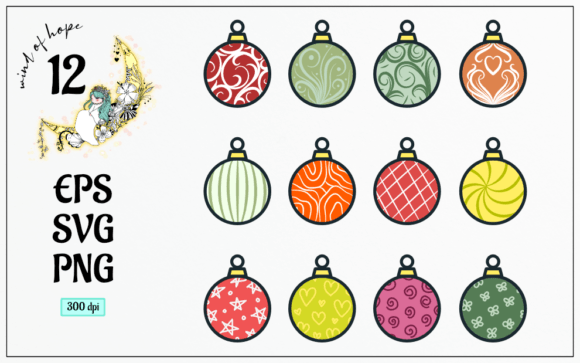
Mastering Holiday Design: A Complete Guide to Christmas Ball Vector Graphics and Digital Assets
The holiday season is arguably the most visually saturated time of the year. From retail storefronts to social media feeds, the air is thick with festive imagery. At the heart of this visual language sits a classic icon: the Christmas ball. For designers, marketers, and creative enthusiasts, having access to high-quality representations of this ornament is not just a luxury—it is a necessity. However, not all digital images are created equal. Understanding the difference between standard raster images and scalable vector graphics can transform your workflow, ensuring your designs look crisp whether they are printed on a business card or blown up for a billboard.
In this guide, we will explore the significance of using professional-grade Christmas ball vector assets. We will break down exactly what you receive when you download a premium design pack, specifically focusing on the versatility provided by EPS, SVG, and high-resolution PNG files. By understanding these formats, you can elevate your creative projects, save time, and maintain professional standards throughout the busy holiday rush.
Why Vector Graphics Are Essential for Holiday Design
To appreciate the value of a Christmas ball vector, one must first understand the fundamental difference between vector and raster images. Raster images, such as JPEGs or standard PNGs, are made up of a grid of pixels. When you enlarge them, the software has to guess what color the new pixels should be, resulting in a blurry, pixelated mess. This is acceptable for web thumbnails but disastrous for print materials.
Vectors, on the other hand, are defined by mathematical equations—points, lines, curves, and shapes. This means they are infinitely scalable. You can shrink a vector Christmas ornament to the size of a favicon or expand it to wrap around a building, and the edges will remain perfectly sharp. For businesses creating holiday catalogs, event invitations, or large-format banners, this scalability is non-negotiable. It ensures brand consistency and professional quality across all mediums.
The Practical Benefits of Scalability
Consider a small business owner designing a holiday promotion. They might need the same Christmas ball graphic for an Instagram post, a website header, and a printed flyer. With a raster image, they would need three different files optimized for each size. With a single vector file, they have one source of truth that adapts to any dimension. This efficiency reduces file management clutter and eliminates the risk of using a low-resolution image by mistake.
Decoding the Zip File: What You Actually Get
When you purchase or download a professional design asset pack, it typically arrives in a compressed ZIP file. For beginners, this folder structure can seem intimidating. However, each file type included serves a specific purpose in the design ecosystem. A comprehensive pack usually includes EPS, SVG, and PNG formats. Let’s dissect what each of these brings to your creative toolkit.
1. The EPS File: The Print Industry Standard
EPS (Encapsulated PostScript) is a legacy vector format that remains the gold standard for professional printing. If you are sending your holiday designs to a commercial printer—for example, for high-gloss brochures, packaging, or large vinyl decals—the EPS file is what you want to use.
- Compatibility: It works seamlessly with industry-standard software like Adobe Illustrator, CorelDRAW, and InDesign.
- Color Accuracy: EPS files support CMYK color modes, which are essential for accurate physical printing.
- Editability: You can ungroup elements, change colors, and adjust shapes without losing quality.
For serious design work where color fidelity and print resolution are paramount, the EPS file is your most reliable ally.
2. The SVG File: The Web and UI Champion
SVG (Scalable Vector Graphics) is an XML-based vector image format for two-dimensional graphics. While EPS is king in print, SVG rules the digital world. Modern web browsers natively support SVGs, making them ideal for websites, apps, and digital presentations.
One of the greatest advantages of SVG is its lightweight nature. Because it is code-based, it often has a smaller file size than a high-resolution PNG, leading to faster website load times—a critical factor for SEO and user experience. Furthermore, SVGs can be styled and animated using CSS and JavaScript. Imagine a Christmas ball on your website that gently sways when a user hovers over it; this interactivity is easily achieved with SVGs but nearly impossible with static raster images.
3. The 12 PNG Files: Ready-to-Use Convenience
While vectors offer flexibility, sometimes you just need an image that works immediately without any design software knowledge. This is where the 12 PNG files come in. These are raster images, but they are crafted with specific features to maximize their utility.
- 300 DPI Resolution: DPI stands for "dots per inch." A resolution of 300 DPI is the standard for high-quality printing. This means these PNGs are sharp enough for home printers, photo books, and standard office documents.
- Translucent Background: Perhaps the most important feature is the transparent background. Unlike a JPEG, which always has a white or colored box around the image, a PNG with transparency allows the Christmas ball to sit naturally over any background color or pattern. You can place it over a red banner, a snowy photo, or a textured paper background without unsightly white edges.
- Variety: The inclusion of 12 different variations suggests a range of colors, patterns, or lighting effects. This variety allows for dynamic compositions. You can layer multiple balls to create depth, use different colors to match a brand palette, or simply choose the one that best fits the mood of your project.
Bridging Creativity and Technology in Modern Workflows
The availability of multi-format asset packs reflects the hybrid nature of modern creativity. Today’s creators are often "hybrid designers"—they might manage a social media account, design internal company newsletters, and create occasional print flyers. They need tools that are flexible enough to handle both digital and physical outputs.
By providing EPS, SVG, and PNGs in a single package, designers empower users to work across platforms. A teacher might use the SVG for an interactive holiday quiz on a smartboard, while simultaneously using the PNG to print out reward stickers for students. A marketing manager might use the EPS for a direct mail campaign and the SVG for the email newsletter header. This cross-platform compatibility reduces the friction between idea and execution.
Common Misunderstandings About Digital Assets
A common assumption is that "high resolution" equals "vector." This is incorrect. A PNG can be high resolution (300 DPI), but it is still made of pixels. If you try to enlarge it beyond its intended size, it will blur. Conversely, a vector has no inherent resolution; it only acquires one when it is exported or printed. Understanding this distinction helps users choose the right file for the right job. Do not use a PNG for a large banner, and do not struggle with complex vector software if you just need a quick image for a PowerPoint slide.
Practical Applications for Your Christmas Ball Vectors
So, how can you apply these assets in real life? Here are a few scenarios where these files shine:
- E-Commerce Product Mockups: Use the transparent PNGs to overlay festive ornaments onto product photos, adding a seasonal touch to your online store.
- Social Media Campaigns: Import the SVG into design tools like Canva or Figma to create animated stories or posts that stand out in crowded feeds.
- Custom Merchandise: Use the EPS file to create cut files for vinyl decals on mugs, t-shirts, or window decorations.
- Educational Materials: Teachers can use the colorful PNGs to create engaging worksheets, flashcards, or classroom decorations that capture students' attention.
Conclusion
In the fast-paced world of digital content creation, having the right assets can make the difference between a good design and a great one. A Christmas ball vector pack that includes EPS, SVG, and high-resolution transparent PNGs offers the ultimate flexibility. It respects the technical requirements of professional printing while embracing the agility needed for digital media. By understanding the strengths of each file format, you can work more efficiently, maintain higher quality standards, and bring your holiday visions to life with clarity and precision. Whether you are a seasoned designer or a beginner looking to add some festive flair to your projects, these tools provide the foundation for creative success.