Streamline Your Social Media Workflow with the Grefashion Instagram Template PSD
Let’s be honest about the current state of social media management. For most creators, small business owners, and freelancers, the pressure to maintain a visually cohesive feed is relentless. You are not just competing for attention; you are competing against algorithms that favor consistency and high-quality visuals. This is where having a reliable design foundation becomes less of a luxury and more of a necessity. The Grefashion Instagram Template PSD offers a practical solution for anyone who needs to produce professional-grade content without spending hours in design software or hiring an expensive agency for every single post.
This template is not merely a collection of pretty graphics. It is a functional tool designed to bridge the gap between amateur snapshots and polished brand aesthetics. By providing a structured layout with smart object functionality, it allows users to drop in their own imagery and walk away with a ready-to-publish asset. Whether you are launching a new product line, promoting a blog post, or simply trying to keep your personal brand active, understanding how to leverage this resource can significantly reduce your weekly workload.
Why Smart Objects Change the Game for Non-Designers
The most intimidating aspect of Photoshop for many users is the layer panel. It can look like a cockpit of confusing controls. However, the core value of the Grefashion template lies in its use of Smart Objects. This feature simplifies the editing process into a few intuitive steps, making high-end design accessible to those who may only have basic computer skills.
Here is how the workflow typically plays out in a real-world scenario. You open the PSD file and locate the image placeholder. Instead of trying to mask, crop, or resize your photo manually to fit a specific shape, you simply double-click on the image layer icon within the group. This action opens a separate window containing only your placeholder. You paste or place your own photograph there, save the file using CTRL+S (or Command+S on Mac), and close the window. Instantly, your main document updates. Your image is perfectly fitted, masked, and styled according to the template’s design rules.
This mechanism eliminates the guesswork. You do not need to worry about aspect ratios ruining your composition or text overlapping incorrectly. The template handles the technical heavy lifting, allowing you to focus on the creative choice of which image best represents your message. For a busy entrepreneur managing their own marketing, this efficiency is invaluable. It turns a thirty-minute design task into a three-minute update.
Technical Specifications That Ensure Quality
When downloading digital assets, it is easy to overlook the technical details until it is too late. A common frustration is finding a template that looks great on screen but appears pixelated or blurry when posted. The Grefashion Instagram Template PSD addresses this by adhering to industry-standard specifications that guarantee crisp output.
The file is built at 300 DPI (dots per inch). While social media platforms compress images, starting with a high-resolution source ensures that your graphics retain their sharpness and detail before compression algorithms take effect. Furthermore, the color mode is set to RGB, which is the standard for all digital displays. Using CMYK, which is intended for print, would result in dull, inaccurate colors on Instagram feeds. By sticking to RGB, the template ensures that the vibrant hues you see on your monitor are exactly what your audience sees on their phones.
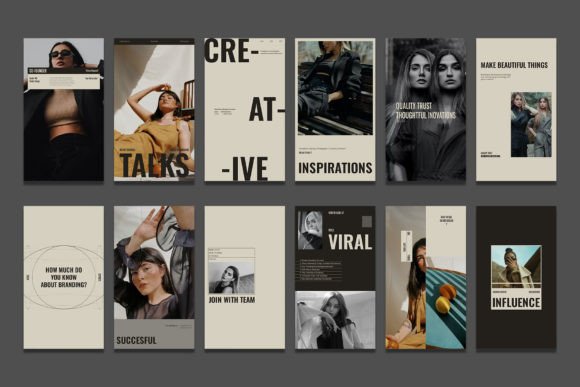
In terms of dimensions, the template covers the two most critical formats for modern Instagram usage. It includes layouts for the standard square post at 1080 x 1080 pixels and the full-screen story format at 1920 x 1080 pixels. This versatility means you can create a cohesive campaign that spans both your permanent feed and your ephemeral stories without needing to redesign elements from scratch. Having both sizes available in one package streamlines the content creation process, ensuring your brand looks consistent across different parts of the app.
Real-World Use Cases for Diverse Users
The utility of this template extends far beyond fashion brands, despite the name. Its clean, adaptable structure makes it suitable for a wide variety of industries and personal projects. Let’s look at how different users might apply this tool in their daily workflows.
- E-commerce Entrepreneurs: If you sell handmade jewelry or vintage clothing, product photography is key. You can use the template to create uniform product shots that highlight details while maintaining a consistent background or frame. This uniformity helps build brand recognition, as followers begin to associate that specific visual style with your shop.
- Content Creators and Bloggers: When promoting a new article or video, you need eye-catching thumbnails. The editable text features allow you to overlay catchy headlines or quotes directly onto your images. Because all text is editable with the text tool, you can quickly swap out headlines for different posts without altering the underlying design structure.
- Event Promoters: For local workshops, webinars, or meetups, the story format is particularly effective. You can drop in a photo of the speaker or venue, add the date and time using the pre-styled text layers, and have a promotional asset ready in minutes. The high resolution ensures that any QR codes or small text remain legible.
- Freelance Service Providers: Consultants, coaches, and freelancers often need to share testimonials or case studies. The template provides a professional frame for client photos or quote graphics, adding a layer of credibility to your social proof. It signals to potential clients that you pay attention to detail and present yourself professionally.
Maximizing Editability for Brand Consistency
One of the standout features of the Grefashion template is that all text is fully editable. This might seem like a basic requirement, but many free templates lock fonts or rasterize text, making changes difficult. With this PSD, you have complete control over typography. You can adjust font sizes, change colors to match your brand palette, and rewrite copy to suit your specific message.
This level of customization is crucial for maintaining brand identity. If your brand uses a specific shade of blue or a particular font family, you can adjust the template once and save it as your master file. From then on, every post you create will automatically align with your visual guidelines. This consistency is what separates amateur accounts from professional brands. It creates a sense of reliability and quality that resonates with audiences.
Moreover, the ease of use encourages experimentation. Because the technical barrier is so low, you might find yourself trying out different types of content. You could test a minimalist approach one week and a bold, text-heavy design the next, all within the same structural framework. This flexibility allows you to refine your social media strategy based on engagement data rather than being limited by your design skills.
Considerations Before You Start Designing
While the Grefashion Instagram Template PSD is designed to be user-friendly, there are a few things to keep in mind to get the best results. First, ensure you have access to Adobe Photoshop. Since this is a PSD file, it requires compatible software to edit the smart objects and text layers. If you are using alternative software, check for compatibility with layered PSD files, though the experience may vary.
Second, consider your source images. The template can only work with what you give it. High-quality, well-lit photographs will yield the best results. If you upload low-resolution or poorly lit images, the final output will reflect that, regardless of how good the template is. Take time to curate or capture images that align with the aesthetic of the template.
Finally, think about your content strategy before you start batch-creating posts. It is efficient to create multiple designs at once, but ensure that each post serves a purpose. Are you educating, entertaining, or selling? The template provides the vessel, but your content provides the value. By combining strategic messaging with the visual polish of the Grefashion template, you create a powerful tool for growing your online presence.
In conclusion, the Grefashion Instagram Template PSD is more than just a design file; it is a productivity enhancer. It democratizes high-quality design, allowing individuals and small businesses to compete visually with larger entities. By leveraging its smart objects, high-resolution standards, and editable features, you can streamline your content creation process, maintain brand consistency, and focus more on connecting with your audience and less on wrestling with design software.