Dreamy Gradients: Elevating Your Design with Modern Aesthetic Backgrounds
In the rapidly evolving world of digital design, finding the right visual foundation can make or break a project. Enter Dreamy, a curated collection that bridges the gap between nostalgic vaporwave aesthetics and sleek, modern cyberpunk vibes. This isn't just another pack of static images; it is a comprehensive toolkit designed for creators who understand that mood matters. Whether you are a seasoned graphic designer, a small business owner crafting your brand identity, or a hobbyist looking to spice up your social media feed, the quality of your background elements dictates the professionalism of your final output.
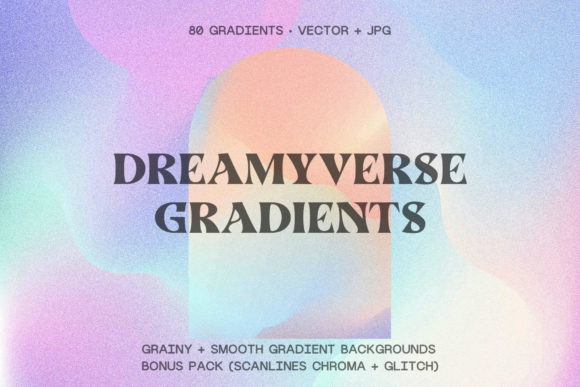
The Dreamy collection offers 80 gradient backgrounds divided into four distinct sets of 20. These aren't random color blends; they are thoughtfully constructed to evoke a specific "tumblresque" atmosphere while maintaining high technical standards. However, many creators stumble when integrating such assets into their workflows. By understanding common pitfalls regarding file formats, resolution usage, and aesthetic application, you can ensure your projects look polished rather than amateurish.
Understanding the Versatility of the Dreamy Collection
Before diving into potential mistakes, it is crucial to appreciate what makes this collection unique. The set includes smooth gradients crafted in Illustrator using gradient mesh technology, alongside grainy textures, scanline chroma effects, and glitch variations. All files are provided at 300 DPI with dimensions of 12x12 inches, making them suitable for both screen and print. The inclusion of AI, EPS, SVG, and JPG formats means you have flexibility, but only if you know how to leverage them correctly.
Many users overlook the sheer range of applications available. These backgrounds are not limited to website headers. They are excellent for branding packages, product packaging, app interfaces, stationery, art prints, and even fabric designs for apparel. Recognizing this versatility early prevents the mistake of underutilizing your purchase or restricting your creative vision to a single medium.
Mistake #1: Ignoring Vector Capabilities for Scalability
One of the most frequent errors beginners make is treating all files in the Dreamy pack as simple raster images. While the JPGs are high-quality at 300 DPI, relying solely on them for large-format printing or responsive web design can lead to pixelation or bloated file sizes. The collection includes AI and EPS vector source files, which are fully editable. Failing to use these means you lose the ability to scale your gradients infinitely without losing quality.
The Fix: Always start with the vector files (AI or EPS) when working on logos, large posters, or any project where size might change. Use the SVG files specifically for web elements to ensure crisp rendering on high-DPI screens like Retina displays. Reserve the JPGs for quick mockups or situations where vector editing software is unavailable. By choosing the right format for the task, you maintain professional sharpness regardless of the output size.
Mistake #2: Misapplying Grain and Glitch Effects
The updated grainy version, featuring brighter colors and higher quality noise, adds a tactile feel to digital designs. Similarly, the scanline and glitch backgrounds offer a retro-futuristic edge. However, a common misstep is applying these heavy textures indiscriminately. Placing a intense glitch gradient behind body text or using a noisy background for a clean, corporate brochure can destroy readability and confuse the audience.
Practical Advice: Treat texture as an accent, not a blanket solution. Use the grainy gradients for mood boards, album covers, or social media stories where atmosphere takes precedence over dense information. For UI design or printed materials requiring legibility, layer the smoother gradients from the first set and use the grainy or glitch variants as subtle overlays with reduced opacity. This approach preserves the "dreamy" vibe without sacrificing usability.
Mistake #3: Overlooking Color Harmony in Branding
With 80 different options, it is tempting to pick the brightest or most complex gradient for a brand identity. Yet, selecting a background based solely on immediate visual impact often leads to clashes with logo colors and typography. The cyberpunk and vaporwave palettes are vibrant, but they require careful balancing to avoid looking chaotic.
When evaluating Dreamy for branding purposes, check the contrast ratios against your foreground elements. A beautiful gradient is useless if your white text disappears into the lighter sections of the mesh. A better approach is to sample colors directly from the gradient mesh in Illustrator to create a cohesive palette for your buttons, icons, and fonts. This ensures your entire design system feels unified rather than disjointed.
Mistake #4: Neglecting File Organization and Workflow Efficiency
Downloading a massive pack of assets can quickly turn into a disorganized mess if you don't have a system in place. Many freelancers waste billable hours searching for the "right" grainy file among dozens of similarly named JPGs. This inefficiency eats into profit margins and delays project delivery.
To avoid this, take time immediately after downloading to organize the four sets into clearly labeled folders: Smooth, Grainy, Scanlines, and Glitch. Furthermore, since the smooth gradients are editable, consider creating a swatch library in your design software. This allows you to apply the exact gradient style with a single click in future projects, significantly speeding up your workflow. Investing ten minutes in organization now saves hours of frustration later.
What to Check Before You Begin
Before committing to a design direction using these assets, ask yourself three key questions:
- Does the medium match the format? If you are designing for a massive billboard, verify you are using the vector sources, not the raster JPGs.
- Is the aesthetic appropriate for the audience? While the vaporwave style is trendy, ensure it aligns with your client's brand voice. A law firm might need the smoother, subtler gradients, while a music festival poster can handle the full force of the glitch effects.
- Have you tested readability? Always overlay your intended typography on the background before finalizing. Adjust brightness or add a semi-transparent overlay if necessary to ensure the message is clear.
Making the Most of Your Creative Assets
The Dreamy collection represents more than just a download; it is an investment in the quality of your visual communication. By avoiding the traps of incorrect file usage, poor texture application, and disorganized workflows, you elevate your output from generic to exceptional. Whether you are creating a tee shirt design, a web landing page, or a set of artistic prints, the key lies in intentionality.
Remember that tools are only as good as the strategy behind them. Take advantage of the editable nature of the vector files to customize hues and blends to fit your specific needs. Don't be afraid to experiment with blending modes in Photoshop or Illustrator to create unique variations of the original 80 backgrounds. The goal is to make the asset work for you, not to force your design to conform to the asset.
Ultimately, successful design is about solving problems visually. When used correctly, these dreamy, cyberpunk-inspired gradients provide a powerful solution for capturing attention and conveying emotion. By approaching your projects with a critical eye and a structured workflow, you ensure that every pixel serves a purpose, resulting in work that resonates with your audience and stands the test of time.